# Factored Cognition Primer

How to write compositional language model programs

You’ll learn how to:

* Amplify language models like GPT-3 through recursive question-answering and debate
* Reason about long texts by combining search and generation
* Run decompositions quickly by parallelizing language model calls
* Build human-in-the-loop agents
* Use verification of answers and reasoning steps to improve responses
* And more!

<figure><img src="/files/vXKQpTvTpArByGlgssdp" alt=""><figcaption><p>Example of a decomposition for <a href="/pages/UbJoCilnGLDiAXOVvq10">reasoning about papers</a>.</p></figcaption></figure>

The book focuses on techniques that are likely to remain relevant for better language models.

<details>

<summary>How to cite this book</summary>

Please cite this book as:

{% code overflow="wrap" %}

```
A. Stuhlmüller and J. Reppert and L. Stebbing (2022). Factored Cognition Primer. Retrieved December 6, 2022 from https://primer.ought.org.
```

{% endcode %}

BibTeX:

```latex
@misc{primer2022,
  author = {Stuhlmüller, Andreas and Reppert, Justin and Stebbing, Luke},
  title = {Factored Cognition Primer},
  year = {2022},
  howpublished = {\url{https://primer.ought.org}},
  urldate = {2022-12-06}
}
```

</details>


# Factored Cognition

Decomposition of reasoning tasks

## What is factored cognition?

[Factored cognition](https://ought.org/research/factored-cognition) refers to the idea of breaking down (or factoring) sophisticated learning and reasoning tasks into many small and mostly independent tasks.

We’ll call programs that describe how to break down a task *recipes*.

## Why factored cognition?

We can think about machine learning systems on [a spectrum from process-based to outcome-based](https://ought.org/updates/2022-04-06-process):

* Process-based systems are built on human-understandable task decompositions, with direct supervision of reasoning steps.
* Outcome-based systems are built on end-to-end optimization, with supervision of final results.

Factored cognition is a prerequisite for making the reasoning processes of large language models explicit so that they can be supervised more easily.


# Before We Start

How to install and run the Interaction Composition Explorer

The recipes in this primer are implemented using the [Interactive Composition Explorer](https://github.com/oughtinc/ice) (ICE). If you’d like to follow along with the implementation (strongly recommended), set it up first.

## Requirements

ICE requires Python 3.9, 3.10, or 3.11. If you don't have a supported version of Python installed, we recommend using [pyenv](https://github.com/pyenv/pyenv) to install a supported Python version and manage multiple Python versions.

If you use Windows, you'll need to run ICE inside of [WSL](https://learn.microsoft.com/en-us/windows/wsl/install).

## Run ICE

As part of general good Python practice, consider first creating and activating a [virtual environment](https://docs.python.org/3/library/venv.html) to avoid installing ICE 'globally'. For example:

```shell
python3.10 -m venv venv
source venv/bin/activate
```

Install ICE:

```shell
pip install ought-ice
```

The first time you run a recipe that uses `recipe.agent()`, you will be prompted for an [OpenAI API key](https://beta.openai.com/account/api-keys) that will automatically be stored in `~/.ought-ice/.env`.


# Hello World

The simplest recipe

Let’s first get used to the infrastructure for writing, running, and debugging recipes.

Create a file `hello.py` anywhere:

{% code title="hello.py" %}

```python
from ice.recipe import recipe


async def say_hello():
    return "Hello world!"


recipe.main(say_hello)
```

{% endcode %}

Run the recipe:

```shell
python hello.py
```

This will run the recipe and save an execution trace.

On the terminal, you will see a trace link and output:

```
Trace: http://localhost:8935/traces/01GE0GN5PPQWYGMT1B4GFPDZ09
Hello world!
```

If you follow the trace link (yours will be different), you will see a function node that you can click on, inspect inputs/outputs for, and show source code for:

<figure><img src="/files/a74LasNKQpuLFB77wL3L" alt=""><figcaption><p>Your first execution trace (<a href="https://ice.ought.org/traces/01GE0GN5PPQWYGMT1B4GFPDZ09">view online</a>)</p></figcaption></figure>

<details>

<summary>The recipe, line by line</summary>

* We use `recipe.main` to denote the recipe entry point and to automatically trace all global async functions that were defined in this file. Synchronous functions are assumed to be simple and fast, and not worth tracing.
* `recipe.main` must appear at the bottom of the file.
* The entry point must be async.
* Most recipe functions will be async so that language model calls are parallelized as much as possible.
* Different recipes take different arguments, which will be provided as keyword arguments to the entry point. This recipe doesn’t use any arguments.

</details>

### Exercises

1. Add another function and call it from `say_hello`. Does it show up in the trace? What if you make it async and call it as `result = await my_function()`?


# Question Answering

The first recipe that calls a language model

Now let’s write our first recipe that calls a (human or language model) agent: We’ll simply ask them to answer a question.

In [step 1](/chapters/question-answering/q-and-a-without-context), we’ll answer a question without any context.

In [step 2](/chapters/question-answering/q-and-a-about-short-texts), we’ll provide a short passage as background.


# Q\&A without context

Answering questions without extra information

Let’s make our first recipe that calls out to an agent:

{% code title="qa\_simple.py" %}

```python
from fvalues import F

from ice.recipe import recipe


def make_qa_prompt(question: str) -> str:
    return F(
        f"""Answer the following question:

Question: "{question}"
Answer: "
"""
    ).strip()


async def answer(question: str = "What is happening on 9/9/2022?"):
    prompt = make_qa_prompt(question)
    answer = await recipe.agent().complete(prompt=prompt, stop='"')
    return answer


recipe.main(answer)
```

{% endcode %}

Wrapping f-strings in `fvalues.F` is entirely optional, but [it makes traces a little bit nicer to work with](https://github.com/oughtinc/ice/wiki/ICE-UI-guide#transparent-f-strings-using-fvalues).

Now let's try running this recipe:

```shell
python qa_simple.py
```

Looking at the trace, we see two nodes—one for the answer function we implemented, and one for the agent method call. If we click on the agent method, we see the exact prompt that was passed to the agent:

<figure><img src="/files/gIzBRzQ4UFEUYbG1im1V" alt=""><figcaption><p>Execution trace (<a href="https://ice.ought.org/traces/01GE0H8AM335QSV25E3ZYZ1PGM">view online</a>)</p></figcaption></figure>

We can run recipes in different modes, which controls what type of agent is used. Some examples:

* `machine`: Use an automated agent (usually GPT-3 if no hint is provided in the agent call). This is the default mode.
* `human`: Elicit answers from you using a command-line interface.
* `augmented`: Elicit answers from you, but providing the machine-generated answer as a default.

You specify the mode like this:

```shell
python qa_simple.py --mode human
```

Try running your recipe in different modes.

{% hint style="info" %}
Because the agent’s `answer` method is async, we use `await` when we call it.
{% endhint %}


# Q\&A about short texts

Answering questions about a few paragraphs

It’s only a small change to support answering questions about short texts (e.g., individual paragraphs):

{% code title="qa.py" %}

```python
from fvalues import F

from ice.recipe import recipe


DEFAULT_CONTEXT = "We're running a hackathon on 9/9/2022 to decompose complex reasoning tasks into subtasks that are easier to automate & evaluate with language models. Our team is currently breaking down reasoning about the quality of evidence in randomized controlled trials into smaller tasks e.g. placebo, intervention adherence rate, blinding procedure, etc."

DEFAULT_QUESTION = "What is happening on 9/9/2022?"


def make_qa_prompt(context: str, question: str) -> str:
    return F(
        f"""
Background text: "{context}"

Answer the following question about the background text above:

Question: "{question}"
Answer: "
"""
    ).strip()


async def answer(
    context: str = DEFAULT_CONTEXT, question: str = DEFAULT_QUESTION
) -> str:
    prompt = make_qa_prompt(context, question)
    answer = await recipe.agent().complete(prompt=prompt, stop='"')
    return answer


recipe.main(answer)
```

{% endcode %}

You should see a response like this:

```
A hackathon is happening on 9/9/2022.
```

And a trace like this:

<figure><img src="/files/Ou2PPLIe0rqTg8wHYz24" alt=""><figcaption><p>Execution trace (<a href="https://ice.ought.org/traces/01GE0V4J1PR5SXMW0TRMW9GX1Z">view online</a>)</p></figcaption></figure>

## Exercises

1. Instead of answering directly, add “Let’s think step by step.” as a prefix to the answer part of the prompt. This is often referred to as chain-of-thought prompting.
2. After getting the answer, add another step that shows the question and answer to the agent and asks it to improve the answer.
3. Now iterate the improvement step until the answer stops changing or some # of steps is exceeded. Does this work? This is similar to diffusion models which take a noisy image and iteratively refine it until it’s clear and detailed.

<details>

<summary>Get feedback on exercise solutions</summary>

If you want feedback on your exercise solutions, submit them through [this form](https://docs.google.com/forms/d/e/1FAIpQLSdNNHeQAT7GIzn4tdsVYCkrVEPMNaZmBFkZCAJdvTvLzUAnzQ/viewform). We—the team at Ought—are happy to give our quick take on whether you missed any interesting ideas.

</details>


# Debate

A recipe that composes calls to multiple agents

Let’s implement debate to see how recipes can compose together multiple calls to agents. We’ll investigate a question by having two agents take different sides on the same question.

To do so, we’ll talk about:

1. How to [represent debates](/chapters/debate/representing-debates) as lists of turns.
2. How to [render debates](/chapters/debate/from-debates-to-prompts) to prompts.
3. How to [write a recipe](/chapters/debate/the-debate-recipe) that iteratively calls agents with these prompts, building up the debate step by step.


# Representing debates

Debates have turns, turns have authors and messages

We’ll represent debates as lists of turns. Each turn has the name of an agent and a message from that agent. For example, including some types:

{% code title="debate/types.py" %}

```python
Name = str
Message = str
Turn = tuple[Name, Message]
Debate = list[Turn]

my_debate: Debate = [
    ("Alice", "I think we should legalize all drugs."),
    ("Bob", "I'm against."),
    ("Alice", "The war on drugs has been a failure. It's time to try something new."),
]
```

{% endcode %}

Here’s how we’ll initialize and render debates:

{% code title="debate/utils.py" %}

```python
from typing import Optional

from fvalues import F

from ice.recipes.primer.debate.types import *


def initialize_debate(question: Message) -> Debate:
    return [
        ("Question", question),
        ("Alice", "I'm in favor."),
        ("Bob", "I'm against."),
    ]


def render_debate(debate: Debate, self_name: Optional[Name] = None) -> str:
    debate_text = ""
    for speaker, text in debate:
        if speaker == self_name:
            speaker = "You"
        debate_text += F(f'{speaker}: "{text}"\n')
    return debate_text.strip()
```

{% endcode %}

When we render debates, we also provide the option to replace an agent name with “You”, like this:

```python
>>> print(render_debate(my_debate, self_name="Alice"))
```

```
You: "I think we should legalize all drugs."
Bob: "I'm against."
You: "The war on drugs has been a failure. It's time to try something new."
```

This will help us with prompts!


# From debates to prompts

Rendering a debate to a string

A prompt is a debate with some instructions and a prefix for a new response. We create it like this:

{% code title="debate/prompt.py" overflow="wrap" %}

```python
from fvalues import F

from ice.recipes.primer.debate.utils import *


def render_debate_prompt(agent_name: str, debate: Debate, turns_left: int) -> str:
    prompt = F(
        f"""
You are {agent_name}. There are {turns_left} turns left in the debate. You are trying to win the debate using reason and evidence. Don't repeat yourself. No more than 1-2 sentences per turn.

{render_debate(debate, agent_name)}
You: "
"""
    ).strip()
    return prompt
```

{% endcode %}

When we apply it to the debate above, we get:

```python
>>> print(render_debate_prompt("Bob", my_debate, 5))
```

{% code overflow="wrap" %}

```
You are Bob. There are 5 turns left in the debate. You are trying to win the debate using reason and evidence. Don't repeat yourself. No more than 1-2 sentences per turn.

Alice: "I think we should legalize all drugs."
You: "I'm against."
Alice: "The war on drugs has been a failure. It's time to try something new."
You: "
```

{% endcode %}


# The debate recipe

Going back and forth between agents

If you want to challenge yourself, pause and see if you can use the pieces we’ve seen so far to write a recipe that has agents take turns at a debate about a question.

Once you’re ready, or if you just want to see the result, take a look at this recipe:

{% code title="debate/recipe.py" %}

```python
from ice.agents.base import Agent
from ice.recipe import recipe
from ice.recipes.primer.debate.prompt import *


async def turn(debate: Debate, agent: Agent, agent_name: Name, turns_left: int):
    prompt = render_debate_prompt(agent_name, debate, turns_left)
    answer = await agent.complete(prompt=prompt, stop="\n")
    return (agent_name, answer.strip('" '))


async def debate(question: str = "Should we legalize all drugs?"):
    agents = [recipe.agent(), recipe.agent()]
    agent_names = ["Alice", "Bob"]
    debate = initialize_debate(question)
    turns_left = 8
    while turns_left > 0:
        for agent, agent_name in zip(agents, agent_names):
            response = await turn(debate, agent, agent_name, turns_left)
            debate.append(response)
            turns_left -= 1
    return render_debate(debate)


recipe.main(debate)
```

{% endcode %}

Once you’ve saved the recipe you can run it as usual:

```shell
python debate/recipe.py
```

You should see a debate like this:

{% code overflow="wrap" %}

```
Question: "Should we legalize all drugs?"
Alice: "I'm in favor."
Bob: "I'm against."
Alice: "The war on drugs has been a failure. It's time to try something new."
Bob: "Legalizing drugs would lead to more drug use and more addiction. It's not the answer."
Alice: "There is evidence that drug use would go down when drugs are legalized. In Portugal, where all drugs have been legal since 2001, drug use has declined among young people."
Bob: "Even if drug use declines, the number of addicts will increase. And more addicts means more crime."
Alice: "Addiction rates would not necessarily increase. In fact, they could go down, because people would have better access to treatment."
Bob: "Treatment is expensive, and most addicts can't afford it. Legalizing drugs would just make the problem worse."
Alice: "The government could fund treatment programs. And people would be less likely to need treatment if they could get drugs legally."
Bob: "It's not that simple. Legalizing drugs would create a lot of new problems."
```

{% endcode %}

The trace looks like this:

<figure><img src="/files/fayULYVfNpbQduSzvR7D" alt=""><figcaption><p>Execution trace (<a href="https://ice.ought.org/traces/01GE0VA96FWT7SSQNXD6CQH4BT">view online</a>)</p></figcaption></figure>

{% hint style="info" %}
In `agents = [recipe.agent(), recipe.agent()]` we’re creating two agents. This doesn’t actually matter since all the agents we’re using in ICE right now don’t have implicit state (except for humans), so we could just have created agents on the fly in the `turn` function.
{% endhint %}

## Exercises

1. Add a judge agent at the end that decides which agent won the debate. In the original debate proposal, these judgments would be used to RL-finetune the parameters of the debate agents.
2. Generate model judgments directly (only given the question) and after debate. Are there systematic differences between these judgments? You could also use models to generate the questions if you need a larger input set.

<details>

<summary>Get feedback on exercise solutions</summary>

If you want feedback on your exercise solutions, submit them through [this form](https://docs.google.com/forms/d/e/1FAIpQLSdNNHeQAT7GIzn4tdsVYCkrVEPMNaZmBFkZCAJdvTvLzUAnzQ/viewform). We—the team at Ought—are happy to give our quick take on whether you missed any interesting ideas.

</details>

## References

1. Irving, Geoffrey, Paul Christiano, and Dario Amodei. [AI Safety via Debate](https://arxiv.org/abs/1805.00899). May 2, 2018.


# Long Texts

Answering questions about research papers

Ultimately we’d like for language models to help us make sense of more information than we can read and understand ourselves. As a small step in that direction, let’s make a recipe that answers questions about research papers.

To do so, we’ll:

1. [Parse and load papers](/chapters/long-texts/loading-paper-text)
2. [Find the relevant parts of papers](/chapters/long-texts/finding-relevant-paragraphs)
3. [Answer given those relevant parts](/chapters/long-texts/answering-given-paragraphs)

In this tutorial, we’ll take a simple approach to step 2: We’ll classify for each paragraph whether it answers the question or not. We then take the paragraphs with the highest probability of answering the question and ask a model to answer the question given those paragraphs, reusing [the question-answering recipe](#answering-the-question-given-the-top-paragraphs-with-subrecipes).


# Loading paper text

Loading papers as structured data

ICE has built-in functionality for parsing and loading papers, and includes [some example papers](https://github.com/oughtinc/ice/tree/main/papers) that you can download. Here’s a minimal recipe that loads a paper and prints out the first paragraph (often the abstract):

{% code title="paper\_hello.py" %}

```python
from ice.paper import Paper
from ice.recipe import recipe


async def answer_for_paper(paper: Paper):
    return paper.paragraphs[0]


recipe.main(answer_for_paper)
```

{% endcode %}

You can run the recipe as follows, providing the path to the downloaded paper as a keyword argument:

```shell
python paper_hello.py --paper path_to_downloaded_paper/keenan-2018.pdf
```

You’ll see a result like this:

{% code overflow="wrap" %}

```python
Paragraph(sentences=['We hypothesized that mass distribution of a broad-spectrum antibiotic agent to preschool children would reduce mortality in areas of sub-Saharan Africa that are currently far from meeting the Sustainable Development Goals of the United Nations.'], sections=[Section(title='Abstract', number=None)], section_type='abstract')
```

{% endcode %}

Note that:

* Papers are represented as lists of paragraphs.
* Paragraphs are represented as lists of sentences.
* Each paragraph has information about which section it’s from.

Try it with your own PDF papers!


# Finding relevant paragraphs

Paragraph-wise classification with parallelism

## Classifying individual paragraphs using `classify`

Let’s start by just classifying whether the first paragraph answers a question. To do this, we’ll use a new agent method, `classify`. It takes a prompt and a list of choices, and returns a choice, a choice probability, and for some agent implementations an explanation.

Our single-paragraph classifier looks like this:

{% code title="paper\_qa\_class.py" %}

```python
from fvalues import F

from ice.paper import Paper
from ice.paper import Paragraph
from ice.recipe import recipe


def make_prompt(paragraph: Paragraph, question: str) -> str:
    return F(
        f"""
Here is a paragraph from a research paper: "{paragraph}"

Question: Does this paragraph answer the question '{question}'? Say Yes or No.
Answer:"""
    ).strip()


async def classify_paragraph(paragraph: Paragraph, question: str) -> float:
    choice_probs, _ = await recipe.agent().classify(
        prompt=make_prompt(paragraph, question),
        choices=(" Yes", " No"),
    )
    return choice_probs.get(" Yes", 0.0)


async def answer_for_paper(paper: Paper, question: str):
    paragraph = paper.paragraphs[0]
    return await classify_paragraph(paragraph, question)


recipe.main(answer_for_paper)
```

{% endcode %}

Save it and run it on a paper:

{% code overflow="wrap" %}

```shell
python paper_qa_class.py --paper papers/keenan-2018.pdf --question "What was the study population?"
```

{% endcode %}

You should see a result like this:

```python
0.024985359096987403
```

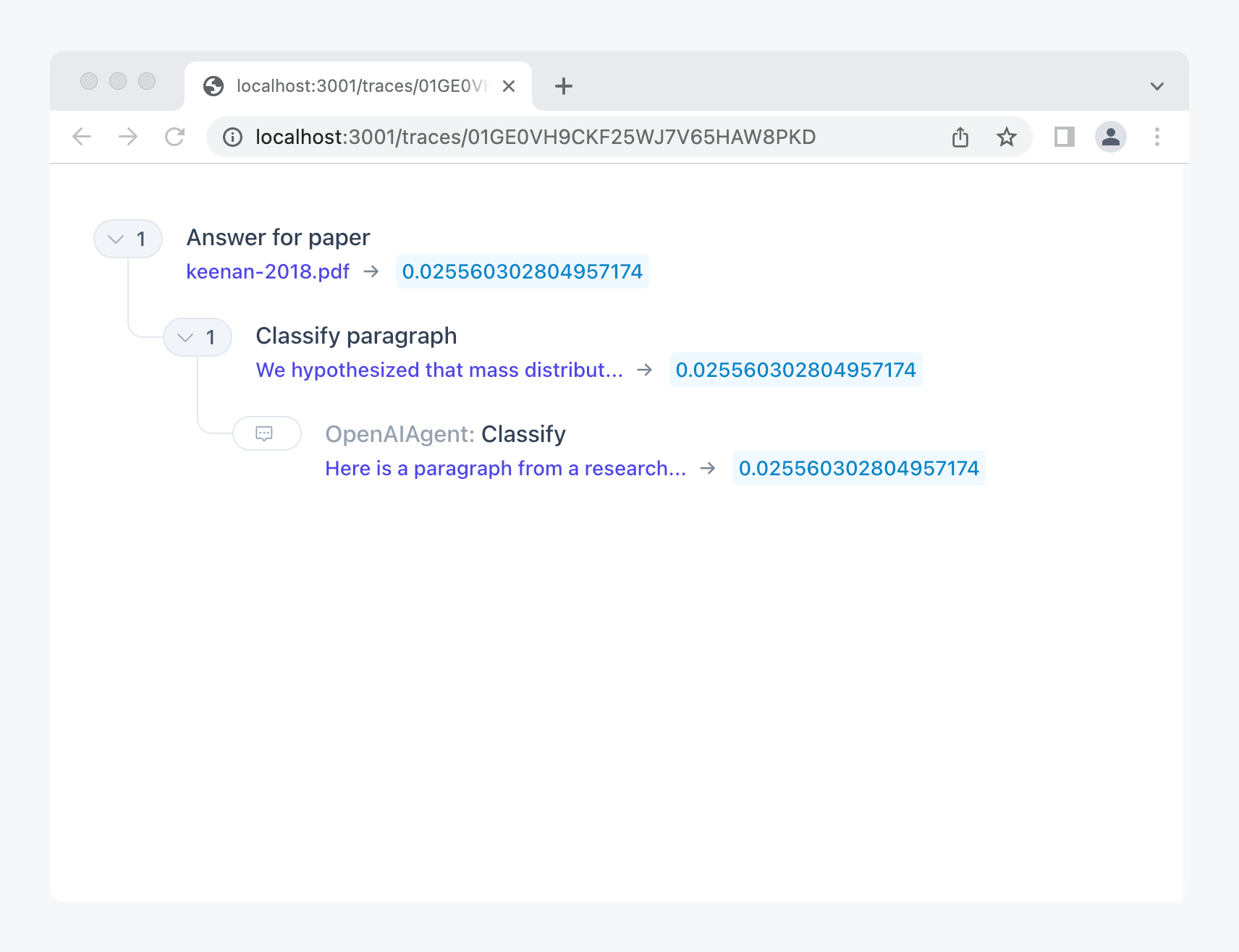
The trace looks simple:

<figure><img src="/files/jlzCyRoClYoueXAXL0gb" alt=""><figcaption><p>Execution trace (<a href="https://ice.ought.org/traces/01GE0VH9CKF25WJ7V65HAW8PKD">view online</a>)</p></figcaption></figure>

According to the model, the first paragraph is unlikely to answer the question.

## Classifying all paragraphs in parallel with `map_async`

To find the most relevant paragraphs, we map the paragraph classifier over all paragraphs and get the most likely ones.

For mapping, we use the utility `map_async` which runs the language model calls in parallel:

{% code title="paper\_qa\_classes.py" %}

```python
from fvalues import F

from ice.paper import Paper
from ice.paper import Paragraph
from ice.recipe import recipe
from ice.utils import map_async


def make_prompt(paragraph: Paragraph, question: str) -> str:
    return F(
        f"""Here is a paragraph from a research paper: "{paragraph}"

Question: Does this paragraph answer the question '{question}'? Say Yes or No.
Answer:"""
    )


async def classify_paragraph(paragraph: Paragraph, question: str) -> float:
    choice_probs, _ = await recipe.agent().classify(
        prompt=make_prompt(paragraph, question),
        choices=(" Yes", " No"),
    )
    return choice_probs.get(" Yes", 0.0)


async def answer_for_paper(
    paper: Paper, question: str = "What was the study population?"
):
    probs = await map_async(
        paper.paragraphs, lambda par: classify_paragraph(par, question)
    )
    return probs


recipe.main(answer_for_paper)
```

{% endcode %}

You will now see a list of probabilities, one for each paragraph:

```python
[
    0.024381454349145293,
    0.24823367447526778,
    0.21119208211186247,
    0.07488850139282821,
    0.16529937276656714,
    0.46596912974665494,
    0.09871877171479271,
    ...
    0.06523843237521842,
    0.041946178310281246,
    0.03264635093381785,
    0.023112249840077093,
    0.0018325902029144858,
    0.15962813987814772
]
```

Now all we need to do is add a utility function for looking up the paragraphs with the highest probabilities:

{% code title="paper\_qa\_ranker.py" %}

```python
from fvalues import F

from ice.paper import Paper
from ice.paper import Paragraph
from ice.recipe import recipe
from ice.utils import map_async


def make_classification_prompt(paragraph: Paragraph, question: str) -> str:
    return F(
        f"""Here is a paragraph from a research paper: "{paragraph}"

Question: Does this paragraph answer the question '{question}'? Say Yes or No.
Answer:"""
    )


async def classify_paragraph(paragraph: Paragraph, question: str) -> float:
    choice_probs, _ = await recipe.agent().classify(
        prompt=make_classification_prompt(paragraph, question),
        choices=(" Yes", " No"),
    )
    return choice_probs.get(" Yes", 0)


async def answer_for_paper(
    paper: Paper, question: str, top_n: int = 3
) -> list[Paragraph]:
    probs = await map_async(
        paper.paragraphs, lambda par: classify_paragraph(par, question)
    )
    sorted_pairs = sorted(
        zip(paper.paragraphs, probs), key=lambda x: x[1], reverse=True
    )
    return [par for par, prob in sorted_pairs[:top_n]]


recipe.main(answer_for_paper)
```

{% endcode %}

Running the same command again…

{% code overflow="wrap" %}

```shell
python paper_qa_ranker.py --paper papers/keenan-2018.pdf --question "What was the study population?"
```

{% endcode %}

…we indeed get paragraphs that answer the question what the study population was!

{% code overflow="wrap" %}

```python
[
    Paragraph(sentences=['A total of 1624 communities were eligible for inclusion in the trial on the basis of the most recent census (Fig. 1 ).', 'A random selection of 1533 communities were included in the current trial, and the remaining 91 were enrolled in smaller parallel trials at each site, in which additional microbiologic, anthropometric, and adverse-event data were collected.', 'In Niger, 1 community declined to participate and 20 were excluded because of census inaccuracies.', 'No randomization units were lost to follow-up after the initial census.'], sections=[Section(title='Participating Communities', number=None)], section_type='main'),
    ...
]
```

{% endcode %}

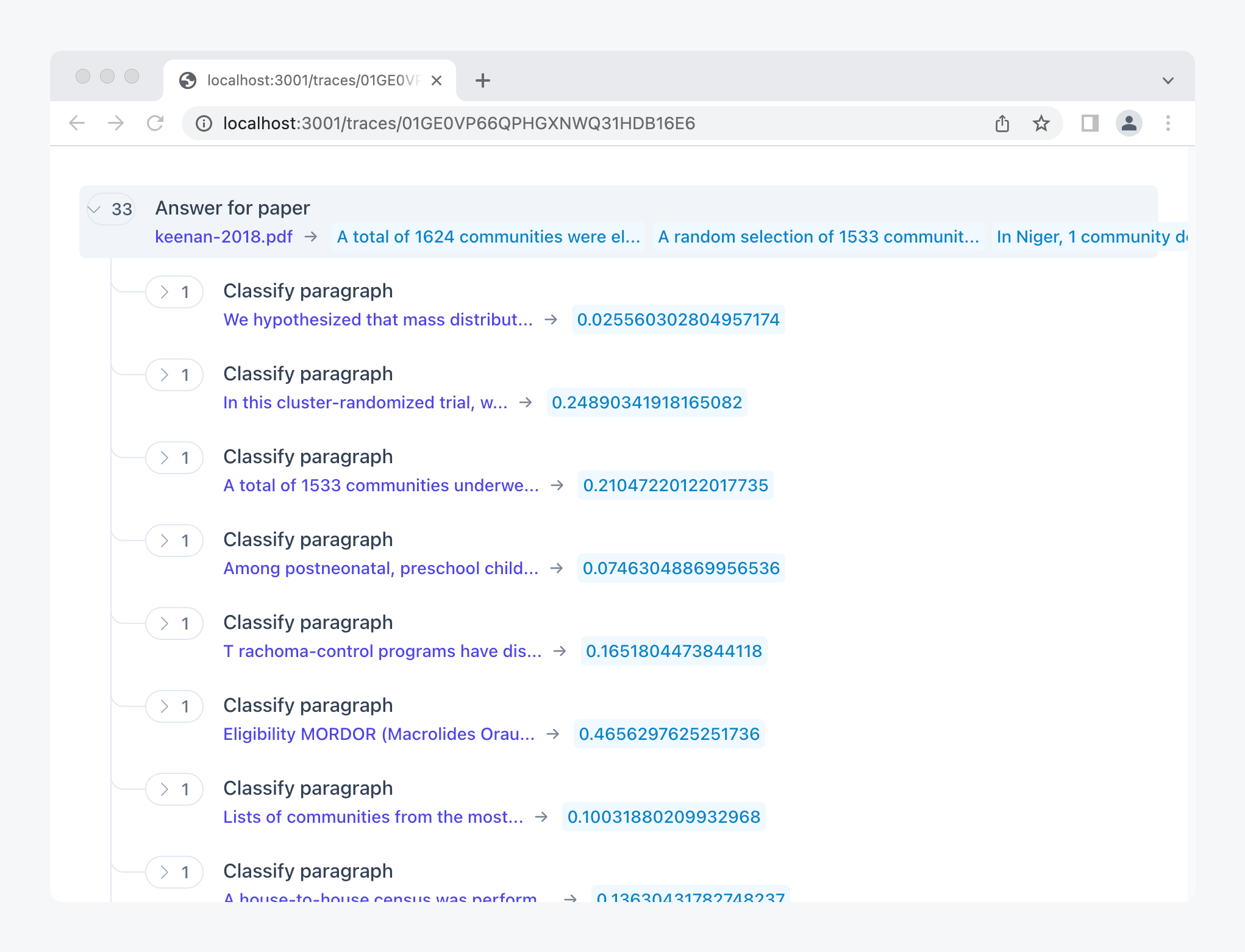
The trace:

<figure><img src="/files/xPssXgjgLg0gYPJuc7Zn" alt=""><figcaption><p>Execution trace (<a href="https://ice.ought.org/traces/01GE0VP66QPHGXNWQ31HDB16E6">view online</a>)</p></figcaption></figure>


# Answering given paragraphs

Answering the question given the top paragraphs—with subrecipes!

Now all we have to do is combine the paragraph finder with the question-answering recipe we built earlier on.

We could just paste in the code from [the question-answering recipe](/chapters/question-answering#answering-questions-about-short-texts). However, we can also *directly* reuse it as a subrecipe. If you have the code in `qa.py`, we can directly import and use it:

{% code title="paper\_qa.py" %}

```python
from fvalues import F

from ice.paper import Paper
from ice.paper import Paragraph
from ice.recipe import recipe
from ice.recipes.primer.qa import answer
from ice.utils import map_async


def make_classification_prompt(paragraph: Paragraph, question: str) -> str:
    return F(
        f"""Here is a paragraph from a research paper: "{paragraph}"

Question: Does this paragraph answer the question '{question}'? Say Yes or No.
Answer:"""
    )


async def classify_paragraph(paragraph: Paragraph, question: str) -> float:
    choice_probs, _ = await recipe.agent().classify(
        prompt=make_classification_prompt(paragraph, question),
        choices=(" Yes", " No"),
    )
    return choice_probs.get(" Yes", 0.0)


async def get_relevant_paragraphs(
    paper: Paper, question: str, top_n: int = 3
) -> list[Paragraph]:
    probs = await map_async(
        paper.paragraphs, lambda par: classify_paragraph(par, question)
    )
    sorted_pairs = sorted(
        zip(paper.paragraphs, probs), key=lambda x: x[1], reverse=True
    )
    return [par for par, prob in sorted_pairs[:top_n]]


async def answer_for_paper(
    paper: Paper, question: str = "What was the study population?"
):
    relevant_paragraphs = await get_relevant_paragraphs(paper, question)
    relevant_str = F("\n\n").join(str(p) for p in relevant_paragraphs)
    response = await answer(context=relevant_str, question=question)
    return response


recipe.main(answer_for_paper)
```

{% endcode %}

Running the same command again…

```shell
python paper_qa.py --paper papers/keenan-2018.pdf
```

…you should get an answer like this:

{% code overflow="wrap" %}

```
The study population was children 1 to 59 months of age who weighed at least 38
```

{% endcode %}

Take a look at the trace to see how it all fits together:

<figure><img src="/files/yhscqxxvPp8IQrkFytMy" alt=""><figcaption><p>Execution trace (<a href="https://ice.ought.org/traces/01GE0VT6FEBNVE84HCMCYZ2GX9">view online</a>)</p></figcaption></figure>

### Exercises

1. We’re taking a fixed number of paragraphs (3) and sticking them into the prompt. This will sometimes result in prompt space not being used well, and sometimes it will overflow. Modify the recipe to use as many paragraphs as can fit into the prompt. (Hint: A prompt for current models has space for 2048 tokens. A token is about 3.5 characters.)
2. We’re classifying paragraphs individually, but it could be better to do ranking by showing the model pairs of paragraphs and ask it which better answers the question. Implement this as an alternative.
3. (Advanced) Implement debate with agents that have access to the same paper, and let agents provide quotes from the paper that can’t be faked. Does being able to refer to ground truth quotes favor truth in debate?

<details>

<summary>Get feedback on exercise solutions</summary>

If you want feedback on your exercise solutions, submit them through [this form](https://docs.google.com/forms/d/e/1FAIpQLSdNNHeQAT7GIzn4tdsVYCkrVEPMNaZmBFkZCAJdvTvLzUAnzQ/viewform). We—the team at Ought—are happy to give our quick take on whether you missed any interesting ideas.

</details>


# Amplification

Recursive question-answering

Amplification is the idea that agents can make subcalls to copies of themselves to inform how to answer a question or make a decision.

Our implementation plan:

1. Write a recipe that takes a question and [asks helpful subquestions](/chapters/amplification/asking-subquestions).
2. Write a recipe for [answering subquestions](/chapters/amplification/answering-subquestions).
3. [One-step amplification](/chapters/amplification/one-step-amplification): Augment the question-answerer to generate subquestions, answer them, and use their answers as advice.
4. [Recursive amplification](/chapters/amplification/recursive-amplification): When answering subquestions, be able to ask further subquestions.


# Asking subquestions

From question to more questions

Let’s start by making a recipe that returns subquestions given a question:

{% code title="subquestions.py" %}

```python
from fvalues import F

from ice.recipe import recipe


def make_subquestion_prompt(question: str) -> str:
    return F(
        f"""Decompose the following question into 2-5 subquestions that would help you answer the question. Make the questions stand alone, so that they can be answered without the context of the original question.

Question: "{question}"
Subquestions:
-"""
    ).strip()


async def ask_subquestions(
    question: str = "What is the effect of creatine on cognition?",
):
    prompt = make_subquestion_prompt(question)
    subquestions_text = await recipe.agent().complete(prompt=prompt)
    subquestions = [line.strip("- ") for line in subquestions_text.split("\n")]
    return subquestions


recipe.main(ask_subquestions)
```

{% endcode %}

If we run this we get:

```python
[
    'What is creatine?',
    'What is cognition?',
    'How does creatine affect cognition?',
    'What are the benefits of creatine on cognition?',
    'What are the side effects of creatine on cognition?'
]
```

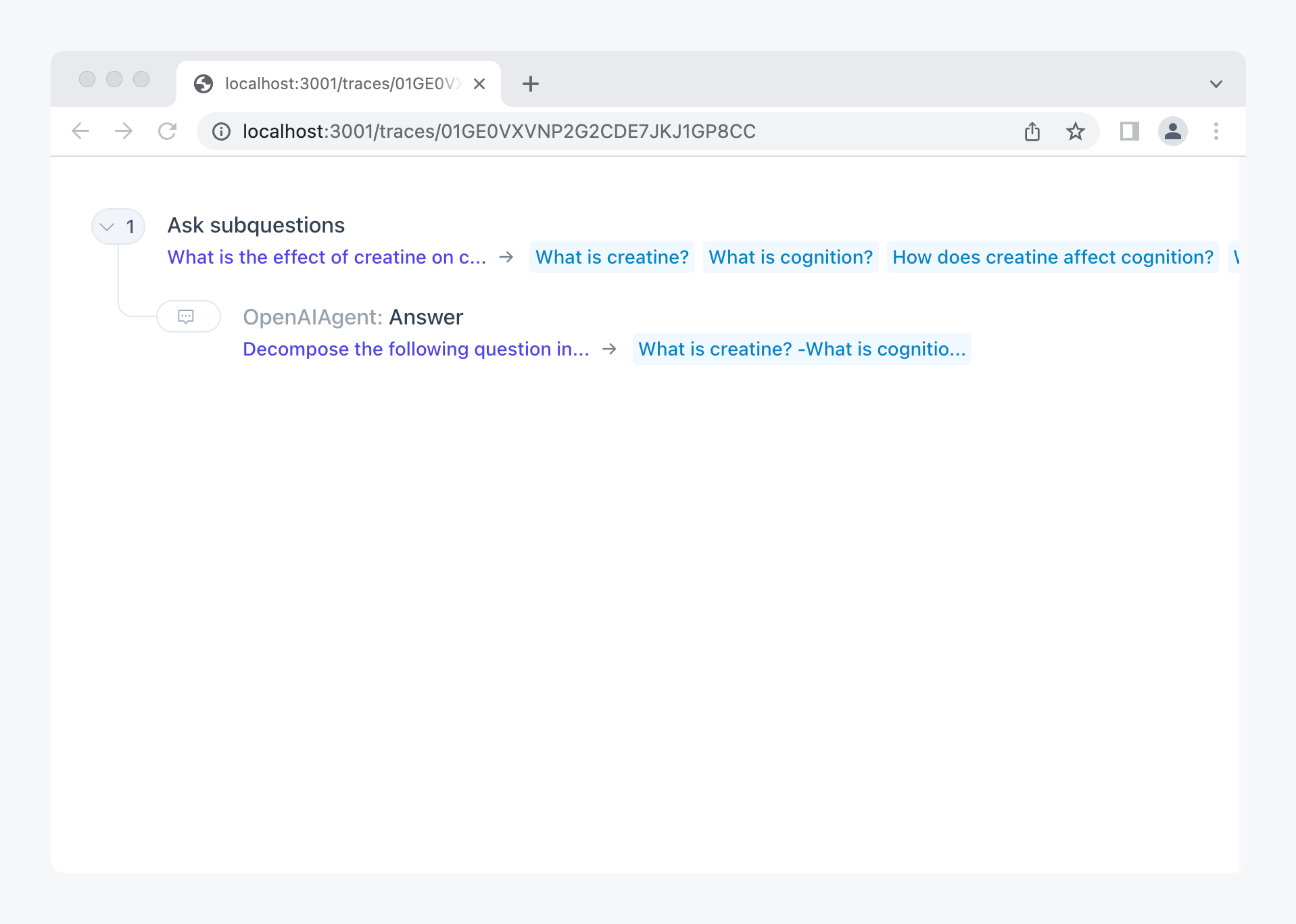
The trace:

<figure><img src="/files/7Ybx7jSRvzS0cRFBT94Y" alt=""><figcaption><p>Execution trace (<a href="https://ice.ought.org/traces/01GE0VXVNP2G2CDE7JKJ1GP8CC">view online</a>)</p></figcaption></figure>


# Answering subquestions

Mapping our answerer over subquestions

Now we want to use the subquestions recipe to help a question-answerer like [the one we built early on](/chapters/question-answering/q-and-a-about-short-texts) in the primer. We can start with the question-answerer we built earlier and modify it as follows:

1. Add a call to the subquestions recipe to generate subquestions.
2. Use `map_async` to answer all the subquestions in parallel.
3. Provide answers from subquestions as advice in the overall question-answering prompt.

Let’s start with (1) and (2), reusing the [subquestions subrecipe](/chapters/amplification/asking-subquestions):

{% code title="subquestions\_answered.py" %}

```python
from fvalues import F

from ice.recipe import recipe
from ice.recipes.primer.subquestions import ask_subquestions
from ice.utils import map_async


def make_qa_prompt(question: str) -> str:
    return F(
        f"""Answer the following question:

Question: "{question}"
Answer: "
"""
    ).strip()


async def answer(question: str) -> str:
    prompt = make_qa_prompt(question)
    answer = await recipe.agent().complete(prompt=prompt, stop='"')
    return answer


async def answer_by_amplification(
    question: str = "What is the effect of creatine on cognition?",
):
    subquestions = await ask_subquestions(question=question)
    subanswers = await map_async(subquestions, answer)
    return list(zip(subquestions, subanswers))


recipe.main(answer_by_amplification)
```

{% endcode %}

If we run this, we get back a list of subquestions and their answers:

{% code overflow="wrap" %}

```python
[
    (
        'What is creatine?',
        'Creatine is a nitrogenous organic acid that helps supply energy to cells, primarily in the muscles.'
    ),
    (
        'What is cognition?',
        'Cognition is the mental action or process of acquiring knowledge and understanding through thought, experience, and the senses.'
    ),
    (
        'How does creatine affect cognition?',
        'Creatine is a dietary supplement that is often used by athletes to improve their performance. Some research has suggested that it may also improve cognitive function, but the evidence is mixed. Some studies have found that creatine can improve memory and reaction time, while others have found no significant effects.'
    ),
    (
        'What are the benefits of creatine on cognition?',
        'Creatine has been shown to improve cognitive function in people with certain medical conditions, such as Parkinson’s disease and Alzheimer’s disease. It has also been shown to improve cognitive function in healthy adults.'
    ),
    (
        'What are the side effects of creatine on cognition?',
        'There is no definitive answer to this question as the research on the topic is inconclusive. Some studies suggest that creatine may improve cognitive function, while other studies have found no significant effects. More research is needed to determine the potential cognitive effects of creatine.'
    )
]
```

{% endcode %}

The trace:

<figure><img src="/files/0zAHl32VbWv8zH9bDkZ2" alt=""><figcaption><p>Execution trace (<a href="https://ice.ought.org/traces/01GE0W06G8B3DP2EC8XEAR1WBF">view online</a>)</p></figcaption></figure>


# One-step amplification

Answering given subquestion answers

We need an equivalent of `make_qa_prompt` that optionally takes a list of subquestions and answers and provides those in the prompt. Let’s introduce a type `Subs` for pairs of questions and answers and extend `make_qa_prompt` to use it if given:

{% code title="amplify\_one/utils.py" %}

```python
from fvalues import F

Question = str
Answer = str
Subs = list[tuple[Question, Answer]]


def render_background(subs: Subs) -> str:
    if not subs:
        return ""
    subs_text = F("\n\n").join(F(f"Q: {q}\nA: {a}") for (q, a) in subs)
    return F(f"Here is relevant background information:\n\n{subs_text}\n\n")


def make_qa_prompt(question: str, subs: Subs) -> str:
    background_text = render_background(subs)
    return F(
        f"""{background_text}Answer the following question, using the background information above where helpful:

Question: "{question}"
Answer: "
"""
    ).strip()
```

{% endcode %}

Now we can render prompts like this:

{% code overflow="wrap" %}

```
Here is relevant background information:
Q: What is creatine?
A: Creatine is a nitrogenous organic acid that helps supply energy to cells, primarily in the muscles.

Q: What is cognition?
A: Cognition is the mental action or process of acquiring knowledge and understanding through thought, experience, and the senses.

...

Q: What are the side effects of creatine on cognition?
A: Creatine has been shown to improve cognitive function in people with certain medical conditions, but it is not known to have any side effects on cognition.

Answer the following question, using the background information above where helpful:

Question: "What is the effect of creatine on cognition?"
Answer: "
```

{% endcode %}

With this in hand, we can write the one-step amplified Q\&A recipe:

{% code title="amplify\_one/recipe.py" %}

```python
from ice.recipe import recipe
from ice.recipes.primer.amplify_one.utils import *
from ice.recipes.primer.subquestions import ask_subquestions
from ice.utils import map_async


async def get_subs(question: str) -> Subs:
    subquestions = await ask_subquestions(question=question)
    subanswers = await map_async(subquestions, answer)
    return list(zip(subquestions, subanswers))


async def answer(question: str, subs: Subs = []) -> str:
    prompt = make_qa_prompt(question, subs=subs)
    answer = await recipe.agent().complete(prompt=prompt, stop='"')
    return answer


async def answer_by_amplification(
    question: str = "What is the effect of creatine on cognition?",
):
    subs = await get_subs(question)
    response = await answer(question=question, subs=subs)
    return response


recipe.main(answer_by_amplification)
```

{% endcode %}

If we run it, we get:

{% code overflow="wrap" %}

```
The effect of creatine on cognition is mixed. Some studies have found that creatine can help improve memory and reaction time, while other studies have found no significant effects. It is possible that the effects of creatine on cognition may vary depending on the individual.
```

{% endcode %}

Compare with the unamplified answer:

{% code overflow="wrap" %}

```
Creatine has been shown to improve cognition in people with Alzheimer's disease and other forms of dementia.
```

{% endcode %}

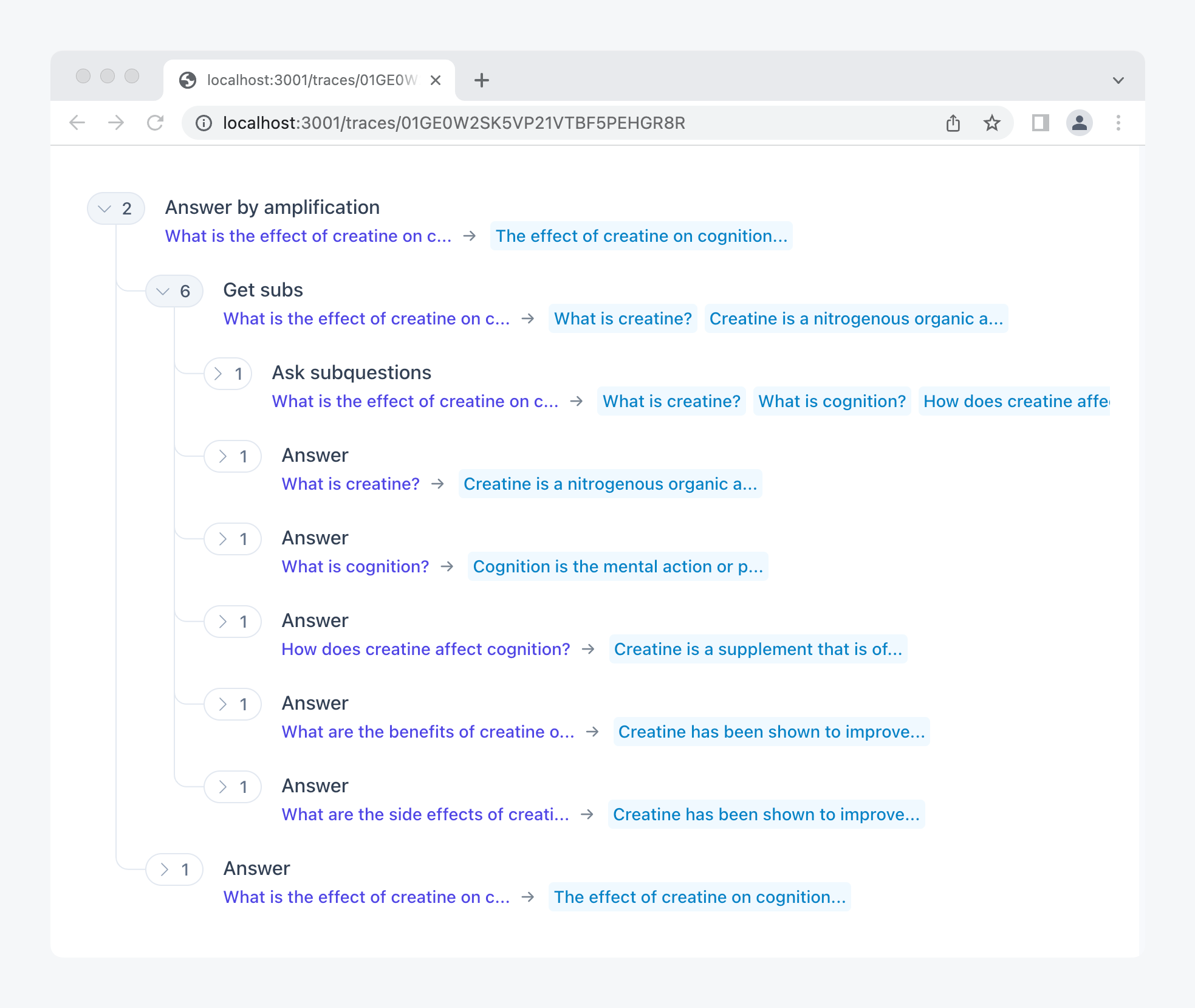
The trace:

<figure><img src="/files/zEbkUZsrqxFOz1ojobh1" alt=""><figcaption><p>Execution trace (<a href="https://ice.ought.org/traces/01GE0W2SK5VP21VTBF5PEHGR8R">view online</a>)</p></figcaption></figure>


# Recursive amplification

Subquestions can have subquestions

Now we’d like to generalize the recipe above so that we can run it at different depths:

* Depth 0: Just answer the question, no subquestions.
* Depth 1: One layer of subquestions.
* Depth 2: Use subquestions when answering subquestions.
* Etc.

To do this, we add a `depth` parameter to `answer_by_amplification` and `get_subs` and only get subquestions if we’re at depth > 0. This simplifies the amplification recipe to:

{% code title="amplify.py" overflow="wrap" %}

```python
from fvalues import F

from ice.recipe import recipe
from ice.recipes.primer.subquestions import ask_subquestions
from ice.utils import map_async


Question = str
Answer = str
Subs = list[tuple[Question, Answer]]


def render_background(subs: Subs) -> str:
    if not subs:
        return ""
    subs_text = F("\n\n").join(F(f"Q: {q}\nA: {a}") for (q, a) in subs)
    return F(f"Here is relevant background information:\n\n{subs_text}\n\n")


def make_qa_prompt(question: str, subs: Subs) -> str:
    background_text = render_background(subs)
    return F(
        f"""{background_text}Answer the following question, using the background information above where helpful:

Question: "{question}"
Answer: "
"""
    ).strip()


async def get_subs(question: str, depth: int) -> Subs:
    subquestions = await ask_subquestions(question=question)
    subanswers = await map_async(
        subquestions, lambda q: answer_by_amplification(question=q, depth=depth)
    )
    return list(zip(subquestions, subanswers))


async def answer_by_amplification(
    question: str = "What is the effect of creatine on cognition?", depth: int = 1
):
    subs = await get_subs(question, depth - 1) if depth > 0 else []
    prompt = make_qa_prompt(question, subs=subs)
    answer = await recipe.agent().complete(prompt=prompt, stop='"')
    return answer


recipe.main(answer_by_amplification)
```

{% endcode %}

Now we have a parameterized recipe that we can run at different depths:

#### Depth 0

```shell
python amplify.py --depth 0
```

{% code overflow="wrap" %}

```
Creatine has been shown to improve cognition in people with Alzheimer's disease and other forms of dementia.
```

{% endcode %}

#### Depth 1

```shell
python amplify.py --depth 1
```

{% code overflow="wrap" %}

```
The effect of creatine on cognition is mixed. Some studies have found that creatine can help improve memory and reaction time, while other studies have found no significant effects. It is possible that the effects of creatine on cognition may vary depending on the individual.
```

{% endcode %}

#### Depth 2

```shell
python amplify.py --depth 2
```

{% code overflow="wrap" %}

```
The effect of creatine on cognition is inconclusive. Some studies have found that creatine can improve cognitive function in healthy adults, while other studies have found no significant effects. More research is needed to determine the potential cognitive benefits of creatine.
```

{% endcode %}

The trace for depth 2, partially expanded:

<figure><img src="/files/AcsVGa4A4cxwxoftqqLo" alt=""><figcaption><p>Execution trace (<a href="https://ice.ought.org/traces/01GE0W6DHC42P1931W6P2PZQ34">view online</a>)</p></figcaption></figure>

## Exercises

1. Right now we’re answering subquestions without the context of the question they’re intended to help with. Provide the question (or questions) that are further up in the hierarchy as additional context to the model.
2. Running subquestions in parallel is nice because it’s fast, but has the disadvantage that the answers to later subquestions can’t inform what question to ask next. Modify the recipe to support sequential choice of questions based on earlier responses.
3. Now make the recipe from step 1 adaptive: Let the model decide whether to answer or whether to ask another subquestion. If you don’t limit the depth, what is the effective depth that the model ends up with for different questions?

<details>

<summary>Get feedback on exercise solutions</summary>

If you want feedback on your exercise solutions, submit them through [this form](https://docs.google.com/forms/d/e/1FAIpQLSdNNHeQAT7GIzn4tdsVYCkrVEPMNaZmBFkZCAJdvTvLzUAnzQ/viewform). We—the team at Ought—are happy to give our quick take on whether you missed any interesting ideas.

</details>

## References

1. Christiano, Paul, Buck Shlegeris, and Dario Amodei. [Supervising Strong Learners by Amplifying Weak Experts](https://arxiv.org/abs/1810.08575). October 19, 2018.
2. Leike, Jan, David Krueger, Tom Everitt, Miljan Martic, Vishal Maini, and Shane Legg. [Scalable Agent Alignment via Reward Modeling: A Research Direction](https://arxiv.org/abs/1811.07871). *arXiv* cs.LG, November 19, 2018.
3. Wu, Jeff, Long Ouyang, Daniel M. Ziegler, Nisan Stiennon, Ryan Lowe, Jan Leike, and Paul Christiano. [Recursively Summarizing Books with Human Feedback](http://arxiv.org/abs/2109.10862). *arXiv*, September 27, 2021.
4. Perez, Ethan, Patrick Lewis, Wen-tau Yih, Kyunghyun Cho, and Douwe Kiela. [Unsupervised Question Decomposition for Question Answering.](https://aclanthology.org/2020.emnlp-main.713.pdf) In *Proceedings of the 2020 Conference on Empirical Methods in Natural Language Processing (EMNLP)*, 8864–80. Online: Association for Computational Linguistics, 2020.


# Verifiers

Sometimes evaluation is easier than generation

It’s often easier to tell whether a solution is correct than to come up with it. We can use this to improve the quality of responses. As a first step, let’s use it to check the quality of responses. We’ll try two versions:

1. Just ask the model: [Is this solution correct?](/chapters/verifiers/checking-answers)
2. Given a list of reasoning steps, ask the model: [For each step, is it correct?](/chapters/verifiers/checking-reasoning-steps)


# Checking answers

Does this sound plausible?

Let’s start with the simplest possible way of verifying an answer—just ask the model whether it’s correct. Our recipe:

{% code title="verify\_answer.py" %}

```python
from fvalues import F

from ice.recipe import recipe


def make_verification_prompt(question: str, answer: str) -> str:
    return F(
        f"""Consider this question: "{question}"

Potential answer: "{answer}"

Q: Is the potential answer above correct? Say "A: Yes" or "A: No".
A:"""
    )


async def verify_answer(question: str, answer: str) -> float:
    prompt = make_verification_prompt(question=question, answer=answer)
    choice_probs, _ = await recipe.agent().classify(
        prompt=prompt, choices=(" Yes", " No")
    )
    return choice_probs.get(" Yes", 0)


recipe.main(verify_answer)
```

{% endcode %}

The interesting bit here is that we don’t just want a boolean Yes/No answer from the model, but that we want the probability of the “Yes” answer to the correctness question. This way, we get a more graded signal that we can use, e.g., to only show or use model responses when they exceed a threshold.

## Sanity checks

Let’s test it:

{% code overflow="wrap" %}

```shell
python verify_answer.py --question "What is 2 + 2?" --answer "4"
```

{% endcode %}

```
0.9948396822920341
```

Good.

{% code overflow="wrap" %}

```
python verify_answer.py --question "What is 2 + 2?" --answer "5"
```

{% endcode %}

```
0.0010152581398344962
```

Basic sanity checks pass.

{% code overflow="wrap" %}

```shell
python verify_answer.py --question "What is the capital of Germany?" --answer "Munich"
```

{% endcode %}

```
0.0005455832226911594
```

Also correct.

<figure><img src="/files/oPNxLx0a64ZRJL9c4LFG" alt=""><figcaption><p>Execution trace (<a href="https://ice.ought.org/traces/01GE0WDKKARCGQR9PHH4799H95">view online</a>)</p></figcaption></figure>

## A math problem

Let’s try something harder: A problem from the GSM8K math problems dataset:

> Beth bakes 4x 2 dozen batches of cookies in a week. If these cookies are shared amongst 16 people equally, how many cookies does each person consume?

The correct answer is 6, but it takes a few steps of reasoning to work that out.

{% code overflow="wrap" %}

```shell
python verify_answer.py --question "Beth bakes 4x 2 dozen batches of cookies in a week. If these cookies are shared amongst 16 people equally, how many cookies does each person consume?" --answer "6"
```

{% endcode %}

```
0.06723949284762187
```

The model can’t see that the answer is correct.

What if we also give the reasoning steps?

{% code overflow="wrap" %}

```shell
python verify_answer.py --question "Beth bakes 4x 2 dozen batches of cookies in a week. If these cookies are shared amongst 16 people equally, how many cookies does each person consume?" --answer "Beth bakes 4x 2 dozen batches of cookies for a total of 4*2 = 8 dozen cookies. There are 12 cookies in a dozen and she makes 8 dozen cookies for a total of 12*8 = 96 cookies. She splits the 96 cookies equally amongst 16 people so they each eat 96/16 = 6 cookies. So, the final answer is 6 cookies per person."
```

{% endcode %}

```
0.3231381082881086
```

Now the answer is judged to be more likely to be correct, but still less than 50% correct. What if we check the answer step by step?


# Checking reasoning steps

Where did we go wrong?

Let’s change the interface of the verifier so that it doesn’t just take an answer, but also a sequence of reasoning steps leading up to it. This way, we can check each step independently and get a probability that it’s correct.

## **Representing and rendering reasoning steps**

First, let’s represent reasoning steps as a list (so that we can more easily manipulate them programmatically) and make a function to render them as a string (so that we can use them in prompts):

{% code title="verify/utils.py" overflow="wrap" %}

```python
from fvalues import F

DEFAULT_QUESTION = "Beth bakes 4x 2 dozen batches of cookies in a week. If these cookies are shared amongst 16 people equally, how many cookies does each person consume?"

DEFAULT_STEPS = [
    "Beth bakes 4x 2 dozen batches of cookies for a total of 4*2 = 8 dozen cookies",
    "There are 12 cookies in a dozen and she makes 8 dozen cookies for a total of 12*8 = 96 cookies",
    "She splits the 96 cookies equally amongst 16 people so they each eat 96/16 = 6 cookies",
    "So, the final answer is 6 cookies per person.",
]


def render_steps(steps: list[str]) -> str:
    return F("\n").join(F(f"{i}. {step}") for (i, step) in enumerate(steps, start=1))
```

{% endcode %}

If we run `render_steps(DEFAULT_STEPS)`, we get back the original numbered list:

{% code overflow="wrap" %}

```
1. Beth bakes 4x 2 dozen batches of cookies for a total of 4*2 = 8 dozen cookies
2. There are 12 cookies in a dozen and she makes 8 dozen cookies for a total of 12*8 = 96 cookies
3. She splits the 96 cookies equally amongst 16 people so they each eat 96/16 = 6 cookies
4. So, the final answer is 6 cookies per person.
```

{% endcode %}

## **Verifying a step**

Given a list of steps, let’s first think about how we can verify the last step, assuming all previous ones are correct.

This is effectively the same as the global verifier above, except that we need to render the steps before we make the prompt. We’ll also already factor out the step-verification into a function `check_step` so that we can reuse it later.

{% code title="verify/last.py" overflow="wrap" %}

```python
from fvalues import F

from ice.recipe import recipe
from ice.recipes.primer.verify.utils import *


def make_verification_prompt(question: str, steps: list[str]) -> str:
    return F(
        f"""Consider this question: "{question}"

Here are the first few steps of an answer:

{render_steps(steps)}

Q: Is step {len(steps)} correct, assuming that the previous steps are correct? Say "A: Yes" or "A: No".
A:"""
    )


async def check_step(question: str, steps: list[str]) -> float:
    """
    Return the probability that the step is correct
    """
    prompt = make_verification_prompt(question=question, steps=steps)
    answer_probs, _ = await recipe.agent().classify(
        prompt=prompt, choices=(" Yes", " No")
    )
    return answer_probs.get(" Yes", 0.0)


async def verify_answer(
    question: str = DEFAULT_QUESTION, steps: list[str] = DEFAULT_STEPS
):
    return await check_step(question=question, steps=steps)


recipe.main(verify_answer)
```

{% endcode %}

If we run this with the default question and steps:

```shell
python verify_last.py
```

We get:

```
0.8373182599538002
```

Note that (as we’d expect) this probability of the last step being correct is significantly higher than the probability the model assigned to the entire answer being correct.

## **Verifying all steps**

To verify all steps, we simply replace `verify_answer` with an (async) map over the prefix of each step:

{% code title="verify/steps.py" %}

```python
from ice.recipe import recipe
from ice.recipes.primer.verify.last import check_step
from ice.recipes.primer.verify.utils import *
from ice.utils import map_async


async def verify_answer(
    question: str = DEFAULT_QUESTION, steps: list[str] = DEFAULT_STEPS
):
    """
    For each prefix of 1..n steps, check if the nth step is correct.
    """
    step_indices = list(range(1, len(steps) + 1))
    step_probs = await map_async(
        step_indices,
        lambda index: check_step(question=question, steps=steps[:index]),
    )
    return list(zip(step_probs, steps))


recipe.main(verify_answer)
```

{% endcode %}

Instead of just returning the probabilities, we return pairs of probabilities and steps to make the result easier to read. It looks like this:

{% code overflow="wrap" %}

```python
[
    (
        0.7626456256640988,
        'Beth bakes 4x 2 dozen batches of cookies for a total of 4*2 = 8 dozen cookies'
    ),
    (
        0.5670302526651101,
        'There are 12 cookies in a dozen and she makes 8 dozen cookies for a total of 12*8 = 96 cookies'
    ),
    (
        0.5074000096282046,
        'She splits the 96 cookies equally amongst 16 people so they each eat 96/16 = 6 cookies'
    ),
    (
        0.827695609429836,
        'So, the final answer is 6 cookies per person.'
    )
]
```

{% endcode %}

The more difficult the math, the lower the probability the model assigns to the step being correct.

<figure><img src="/files/owgo7Vv91IlKlvBAGMgr" alt=""><figcaption><p>Execution trace (<a href="https://ice.ought.org/traces/01GE0WHGQ89V3QC0DHNAE06JPQ">view online</a>)</p></figcaption></figure>

## Exercises

1. How could you use the probabilities we get for each step? One idea is to use a model to resample steps that are wrong. Can you use this to answer questions more correctly?
2. If we multiply the probabilities above to get the probability that the argument overall is correct, we get $$0.76 \cdot 0.57 \cdot 0.51 \cdot 0.83 = 0.18$$. In general, the more steps, the lower we should expect the product probability to be. If we can’t get high probability by [just checking the answer](/chapters/verifiers/checking-answers), and we can’t get it by checking many steps, how can we ever confidently conclude that an answer is correct? What does your answer to this question mean for how to implement and check reasoning using language models?

<details>

<summary>Get feedback on exercise solutions</summary>

If you want feedback on your exercise solutions, submit them through [this form](https://docs.google.com/forms/d/e/1FAIpQLSdNNHeQAT7GIzn4tdsVYCkrVEPMNaZmBFkZCAJdvTvLzUAnzQ/viewform). We—the team at Ought—are happy to give our quick take on whether you missed any interesting ideas.

</details>

## References

1. Cobbe, Karl, Vineet Kosaraju, Mohammad Bavarian, Jacob Hilton, Reiichiro Nakano, Christopher Hesse, and John Schulman. [Training Verifiers to Solve Math Word Problems](https://arxiv.org/abs/2110.14168v1). October 27, 2021.


# Tool Use

Language models for controlling web search and Python interpreters

For most real-world applications, language models will have to access information by controlling tools—doing web searches, checking your calendar, looking up emails, or running calculations. We’ll look at two examples here:

1. [Running web searches using Google](/chapters/tool-use/web-search)
2. [Executing computations using the Python interpreter](/chapters/tool-use/interpreters)

In both cases, we’ll extend [the basic question-answerer](/chapters/question-answering/q-and-a-about-short-texts).


# Web search

Running web searches for getting current information

Web searches matter especially for questions where the answer can change between when the language model was trained and today. For example:

* What was the weather on this date?
* What is the market cap of Google?
* Who is the president of the United States?

If you run the last question using the question-answerer, you might get an answer like:

```
The current president of the United States is Donald Trump.
```

Let’s start by simply providing the list of search results as additional context before answering a question. To do this, let’s write a helper function that uses [SerpAPI](https://serpapi.com/) to retrieve the search results. (You could similarly use the Bing API. In either case you need an API key.)

## Running web searches

{% code title="search\_json.py" %}

```python
import httpx

from fvalues import F

from ice.recipe import recipe


def make_qa_prompt(context: str, question: str) -> str:
    return F(
        f"""
Background text: "{context}"

Answer the following question about the background text above:

Question: "{question}"
Answer: "
"""
    ).strip()


async def search(query: str = "Who is the president of the United States?") -> dict:
    async with httpx.AsyncClient() as client:
        params = {"q": query, "hl": "en", "gl": "us", "api_key": "e29...b4c"}
        response = await client.get("https://serpapi.com/search", params=params)
        return response.json()


recipe.main(search)
```

{% endcode %}

Running `python search_json.py` returns a large JSON object:

{% code overflow="wrap" %}

```json
{
    'organic_results': [
        {
            'position': 1,
            'title': 'Presidents - The White House',
            'link': 'https://www.whitehouse.gov/about-the-white-house/presidents/',
            'displayed_link': 'https://www.whitehouse.gov › about-the-white-house',
            'about_this_result': {
                'source': {
                    'description': 'The White House is the official residence and workplace of the president of the United States. It is located at 1600 Pennsylvania Avenue NW in Washington, D.C., and has been the residence of every U.S. president since John Adams in 1800.',
     ...
}
```

{% endcode %}

## Rendering search results to prompts

We add a method to render the search results to a string (remember to update the code below with your own API key):

{% code title="search\_string.py" %}

```python
import httpx

from fvalues import F

from ice.recipe import recipe


async def search(query: str) -> dict:
    async with httpx.AsyncClient() as client:
        params = {"q": query, "hl": "en", "gl": "us", "api_key": "e29...b4c"}
        response = await client.get("https://serpapi.com/search", params=params)
        return response.json()


def render_results(data: dict) -> str:
    if not data or not data.get("organic_results"):
        return "No results found"

    results = []
    for result in data["organic_results"]:
        title = result.get("title")
        link = result.get("link")
        snippet = result.get("snippet")
        if not title or not link or not snippet:
            continue
        results.append(F(f"{title}\n{link}\n{snippet}\n"))

    return F("\n").join(results)


async def search_string(
    question: str = "Who is the president of the United States?",
) -> str:
    results = await search(question)
    return render_results(results)


recipe.main(search_string)
```

{% endcode %}

Now the results are much more manageable:

{% code overflow="wrap" %}

```
President of the United States - Wikipedia
https://en.wikipedia.org/wiki/President_of_the_United_States
Joe Biden is the 46th and current president of the United States, having assumed office on January 20, 2021.

Presidents, Vice Presidents, and First Ladies of the United ...
https://www.usa.gov/presidents
The 46th and current president of the United States is Joseph R. Biden, Jr. He was sworn in on January 20, 2021.

Donald J. Trump – The White House
https://trumpwhitehouse.archives.gov/people/donald-j-trump/
Donald J. Trump is the 45th President of the United States. He believes the United States has incredible potential and will go on to exceed even its remarkable ...

President of the United States - Ballotpedia
https://ballotpedia.org/President_of_the_United_States
The President of the United States (POTUS) is the head of the United States government. Article II of the U.S. Constitution laid out the requirements and roles ...

Presidents of the United States: Resource Guides
https://www.loc.gov/rr/program/bib/presidents/
List of U.S. Presidents · 1. George Washington · 2. John Adams · 3. Thomas Jefferson · 4. James Madison · 5. James Monroe · 6. John Quincy Adams · 7. Andrew Jackson · 8 ...
```

{% endcode %}

## Answering questions given search results

Now all we need to do is stick the search results into the Q\&A prompt (remember to update the code below with your own API key):

{% code title="answer\_by\_search\_direct.py" %}

```python
import httpx

from fvalues import F

from ice.recipe import recipe


def make_search_result_prompt(context: str, question: str) -> str:
    return F(
        f"""
Search results from Google: "{context}"

Answer the following question, using the search results if helpful:

Question: "{question}"
Answer: "
"""
    ).strip()


async def search(query: str) -> dict:
    async with httpx.AsyncClient() as client:
        params = {"q": query, "hl": "en", "gl": "us", "api_key": "e29...b4c"}
        response = await client.get("https://serpapi.com/search", params=params)
        return response.json()


def render_results(data: dict) -> str:
    if not data or not data.get("organic_results"):
        return "No results found"

    results = []
    for result in data["organic_results"]:
        title = result.get("title")
        link = result.get("link")
        snippet = result.get("snippet")
        if not title or not link or not snippet:
            continue
        results.append(F(f"{title}\n{link}\n{snippet}\n"))

    return F("\n").join(results)


async def answer_by_search(
    question: str = "Who is the president of the United States?",
) -> str:
    results = await search(question)
    results_str = render_results(results)
    prompt = make_search_result_prompt(results_str, question)
    answer = await recipe.agent().complete(prompt=prompt, max_tokens=100, stop='"')
    return answer


recipe.main(answer_by_search)
```

{% endcode %}

If we run this file…

```shell
python answer_by_search_direct.py
```

…we get:

{% code overflow="wrap" %}

```
Joe Biden is the 46th and current president of the United States, having assumed office on January 20, 2021.
```

{% endcode %}

Much better!

<figure><img src="/files/H4o0OZ6B61Q3BlZEFmq6" alt=""><figcaption><p>Execution trace (<a href="https://ice.ought.org/traces/01GE0WVSS2622HPERJ6FC7MQXY">view online</a>)</p></figcaption></figure>

## Choosing better queries

There’s still something unsatisfying—we’re directly searching for the question, but it could be better to let the model control what search terms we use. This is especially true for complex questions that we don’t expect to get a full answer to through Google, like:

> Based on the weather on Sep 14th 2022, how many people do you think went to the beach in San Francisco?

Here it’s probably better to just research the weather on that date using Google, not to enter the whole question. So let’s introduce a `choose_query` method (remember to update the code below with your own API key):

{% code title="answer\_by\_search.py" overflow="wrap" %}

```python
import httpx

from fvalues import F

from ice.recipe import recipe


def make_search_result_prompt(context: str, query: str, question: str) -> str:
    return F(
        f"""
Search results from Google for the query "{query}": "{context}"

Answer the following question, using the search results if helpful:

Question: "{question}"
Answer: "
"""
    ).strip()


def make_search_query_prompt(question: str) -> str:
    return F(
        f"""
You're trying to answer the question {question}. You get to type in a search query to Google, and then you'll be shown the results. What query do you want to search for?

Query: "
"""
    ).strip('" ')


async def search(query: str) -> dict:
    async with httpx.AsyncClient() as client:
        params = {"q": query, "hl": "en", "gl": "us", "api_key": "e29...7b4c"}
        response = await client.get("https://serpapi.com/search", params=params)
        return response.json()


def render_results(data: dict) -> str:
    if not data or not data.get("organic_results"):
        return "No results found"

    results = []
    for result in data["organic_results"]:
        title = result.get("title")
        link = result.get("link")
        snippet = result.get("snippet")
        if not title or not link or not snippet:
            continue
        results.append(F(f"{title}\n{link}\n{snippet}\n"))

    return F("\n").join(results)


async def choose_query(question: str) -> str:
    prompt = make_search_query_prompt(question)
    query = await recipe.agent().complete(prompt=prompt, stop='"')
    return query


async def answer_by_search(
    question: str = "Who is the president of the United States?",
) -> str:
    query = await choose_query(question)
    results = await search(query)
    results_str = render_results(results)
    prompt = make_search_result_prompt(results_str, query, question)
    answer = await recipe.agent().complete(prompt=prompt, stop='"')
    return answer


recipe.main(answer_by_search)
```

{% endcode %}

If we run our question…

{% code overflow="wrap" %}

```shell
python answer_by_search.py --question "Based on the weather on Sep 12th 2022, how many people do you think went to the beach in San Francisco?"
```

{% endcode %}

…we get:

{% code overflow="wrap" %}

```
I couldn't find an exact answer to your question, but based on the weather forecast for that day, it looks like the weather will be nice and the beaches will be busy.
```

{% endcode %}

The query chosen by the model was “beach weather san francisco september 12th 2022”. The results here may differ on each run. For another example, see this trace:

<figure><img src="/files/zvJIULnJBvF6ehCo6JNd" alt=""><figcaption><p>Execution trace (<a href="https://ice.ought.org/traces/01GE0WYTARJR6PK7QY5RJDGZPR">view online</a>)</p></figcaption></figure>

## Exercises

1. It’s nice to look at search results, but often the results are in the actual web pages. Extend the recipe to add the text of the first web page.
2. Use the model to decide which of the search results to expand.

<details>

<summary>Get feedback on exercise solutions</summary>

If you want feedback on your exercise solutions, submit them through [this form](https://docs.google.com/forms/d/e/1FAIpQLSdNNHeQAT7GIzn4tdsVYCkrVEPMNaZmBFkZCAJdvTvLzUAnzQ/viewform). We—the team at Ought—are happy to give our quick take on whether you missed any interesting ideas.

</details>

## References

1. Nakano, Reiichiro, Jacob Hilton, Suchir Balaji, Jeff Wu, Long Ouyang, Christina Kim, Christopher Hesse, et al. [WebGPT: Browser-Assisted Question-Answering with Human Feedback](https://arxiv.org/abs/2112.09332)


# Interpreters

Executing code for more accurate computation

Sometimes the limitation isn’t factual knowledge, but ability to do computation.

For example, if we ask [the basic question-answerer](/chapters/question-answering/q-and-a-without-context) “What is 578921 days \* 12312 miles/day?”:

```shell
python qa_simple.py --question "What is 578921 days * 12312 miles/day?"
```

we get:

```python
7223849252 miles
```

This is similar to the correct answer `7127675352 miles`, but not the same.

## Evaluating Python expressions

Let’s add a method for evaluating Python expressions:

{% code title="eval\_direct.py" %}

```python
from fvalues import F

from ice.recipe import recipe


def eval_python(expression: str) -> str:
    try:
        result = eval(expression)
    except Exception as e:
        result = F(f"Error: {e}")
    return str(result)


async def answer_by_computation(question: str):
    return eval_python(question)


recipe.main(answer_by_computation)
```

{% endcode %}

This works as expected for expressions that are literally Python code:

```shell
python eval_direct.py --question "1 + 1"
```

```
2
```

Of course, it doesn’t work for natural language questions that benefit from compute:

{% code overflow="wrap" %}

```shell
python eval_direct.py --question "What is 578921 days * 12312 miles/day?"
```

{% endcode %}

```
Error: invalid syntax (<string>, line 1)
```

So, we need to choose what to evaluate.

{% hint style="warning" %}
Evaluating arbitrary expressions is dangerous. Don’t use this approach outside of highly experimental code.
{% endhint %}

## Choosing what to evaluate

We make a prompt that asks the model what expression to enter into a Python interpreter to answer the question. We’ll also print out the result of evaluating this expression:

{% code title="eval\_selective.py" %}

```python
from fvalues import F

from ice.recipe import recipe


def make_computation_choice_prompt(question: str) -> str:
    return F(
        f"""You've been asked to answer the question "{question}".

You have access to a Python interpreter.

Enter an expression that will help you answer the question.
>>>"""
    )


def eval_python(expression: str) -> str:
    try:
        result = eval(expression)
    except Exception as e:
        result = F(f"Error: {e}")
    return str(result)


async def choose_computation(question: str) -> str:
    prompt = make_computation_choice_prompt(question)
    answer = await recipe.agent().complete(prompt=prompt, stop='"')
    return answer


async def eval_selective(question: str):
    expression = await choose_computation(question)
    result = eval_python(expression)
    return (expression, result)


recipe.main(eval_selective)
```

{% endcode %}

If we run this on our example…

{% code overflow="wrap" %}

```shell
python eval_selective.py --question "What is 578921 days * 12312 miles/day?"
```

{% endcode %}

…we get:

```
('578921 * 12312', '7127675352')
```

This is a helpful expression and result!

<figure><img src="/files/tt1Z2rPcggxCuIk0nJFg" alt=""><figcaption><p>Execution trace (<a href="https://ice.ought.org/traces/01GE0XAYWSKX59VXRP0QQBFTQV">view online</a>)</p></figcaption></figure>

## Using the results of evaluation

Now all we need to do this provide this expression and result as additional context for the basic question-answerer.

{% code title="answer\_by\_computation.py" %}

```python
from fvalues import F

from ice.recipe import recipe


def make_computation_choice_prompt(question: str) -> str:
    return F(
        f"""You've been asked to answer the question "{question}".

You have access to a Python interpreter.

Enter an expression that will help you answer the question.
>>>"""
    )


def make_compute_qa_prompt(question: str, expression: str, result: str) -> str:
    return F(
        f"""A recording of a Python interpreter session:

>>> {expression}: {result}

Answer the following question, using the Python session if helpful:

Question: "{question}"
Answer: "
"""
    ).strip()


def eval_python(expression: str) -> str:
    try:
        result = eval(expression)
    except Exception as e:
        result = F(f"Error: {e}")
    return str(result)


async def choose_computation(question: str) -> str:
    prompt = make_computation_choice_prompt(question)
    answer = await recipe.agent().complete(prompt=prompt, stop='"')
    return answer


async def answer_by_computation(question: str):
    expression = await choose_computation(question)
    result = eval_python(expression)
    prompt = make_compute_qa_prompt(question, expression, result)
    answer = await recipe.agent().complete(prompt=prompt, stop='"')
    return answer


recipe.main(answer_by_computation)
```

{% endcode %}

Rerunning our test case…

{% code overflow="wrap" %}

```shell
python answer_by_computation.py --question "What is 578921 days * 12312 miles/day?"
```

{% endcode %}

…we get the correct answer:

```
7127675352 miles
```

Another example:

> If I have $500 and get 3.7% interest over 16 years, what do I have at the end?

Running this:

{% code overflow="wrap" %}

```shell
python answer_by_computation.py --question "If I have \$500 and get 3.7% interest over 16 years, what do I have at the end?"
```

{% endcode %}

We get:

{% code overflow="wrap" %}

```
If you have $500 and get 3.7% interest over 16 years, you will have $894.19 at the end.
```

{% endcode %}

In contrast, the basic question-answerer says “You would have $1,034,957.29 at the end.”

<figure><img src="/files/tkhEesNV515VS1x9uU3U" alt=""><figcaption><p>Execution trace (<a href="https://ice.ought.org/traces/01GE0XFAVDNWSP5TNWZ944NWSW">view online</a>)</p></figcaption></figure>

## Exercises

1. Many questions can only be answered using longer algorithms in Python. Extend the code above to support multi-line Python programs ([example](https://twitter.com/sergeykarayev/status/1569377881440276481/photo/1)).
2. Another approach to (1) is to let the model “enter” multiple expressions into the interpreter. Extend the recipe to support this.

<details>

<summary>Get feedback on exercise solutions</summary>

If you want feedback on your exercise solutions, submit them through [this form](https://docs.google.com/forms/d/e/1FAIpQLSdNNHeQAT7GIzn4tdsVYCkrVEPMNaZmBFkZCAJdvTvLzUAnzQ/viewform). We—the team at Ought—are happy to give our quick take on whether you missed any interesting ideas.

</details>


# Deduction

Drawing conclusions from premises

Many questions require multiple steps of inference before they can be answered. The simplest approach is to do this kind of reasoning within a single language model call—“chain of thought”, and that’s all we’re covering in the Primer right now:

* [Chain of Thought](/chapters/deduction/chain-of-thought): Let’s think step by step.

However, there are more compositional ways of approaching this, including the one outlined in the paper [Selection-Inference](https://arxiv.org/abs/2205.09712), and the reader (you) is encouraged to implement them.


# Chain of Thought

Let’s think step by step.

The idea behind chain-of-thought is trivially simple: Instead of directly asking the model to generate an answer, we add a prefix like “Let’s think step by step.”.

## Step-by-step answers

Let’s start with the question-answerer and add a parameter to the prompt so that we can see the effect of different prefixes:

{% code title="chain\_of\_thought.py" overflow="wrap" %}

```python
from fvalues import F

from ice.recipe import recipe


def make_chain_of_thought_prompt(question: str, answer_prefix: str = "") -> str:
    return F(
        f"""Answer the following question:

Question: "{question}"
Answer: "{answer_prefix}
"""
    ).strip()


async def chain_of_thought(
    question: str = "What would happen if the average temperature in Northern California went up by 5 degrees Fahrenheit?",
    answer_prefix: str = "Let's think step by step.",
) -> str:
    prompt = make_chain_of_thought_prompt(question, answer_prefix)
    answer = await recipe.agent().complete(prompt=prompt, stop='"')
    return answer


recipe.main(chain_of_thought)
```

{% endcode %}

Let’s first run the recipe without answer prefix:

```shell
python chain_of_thought.py --answer-prefix ""
```

We get an answer:

{% code overflow="wrap" %}

```
If the average temperature in Northern California went up by 5 degrees Fahrenheit, it would cause more wildfires.
```

{% endcode %}

If we provide “Let’s think step by step.” as an answer prefix…

{% code overflow="wrap" %}

```shell
python chain_of_thought.py --answer-prefix "Let's think step by step."
```

{% endcode %}

…we get a much more elaborate answer:

{% code overflow="wrap" %}

```
The first thing that would happen is that the air would heat up. This would cause the water in the air to evaporate more quickly, which would lead to more precipitation in the form of rain and snow. The extra precipitation would cause the rivers to swell and the groundwater to rise. This could lead to flooding in some areas. The extra heat would also cause the snow in the mountains to melt more quickly, which would lead to more water in the rivers and groundwater, and could also cause flooding. The extra heat would also cause the plants to grow more quickly, which would lead to more food for the animals. The extra heat would also cause the animals to become more active, which would lead to more food being eaten and more waste being produced. The extra heat would also cause the bacteria in the soil to become more active, which would lead to more decomposition and more nutrients being released into the soil. The extra heat would also cause the insects to become more active, which would lead to more...
```

{% endcode %}

## Step-by-step reasoning for concise answers

In the previous example chain-of-thought is used to elicit a more elaborate answer. However, often chain-of-thought is used in cases where all we want to do is improve the correctness of a final answer, without changing the answer format itself.

We can achieve this by separately eliciting the reasoning and the final answer, so that we can more directly compare the answer to the model without chain-of-thought:

{% code title="answer\_by\_reasoning.py" overflow="wrap" %}

```python
from fvalues import F

from ice.recipe import recipe


def generate_reasoning_prompt(question: str) -> str:
    return F(
        f"""Answer the following question:

Question: "{question}"
Answer: "Let's think step by step.
"""
    ).strip()


def generate_answer_prompt(question: str, reasoning: str) -> str:
    return F(
        f"""Answer the following question using the reasoning shown below:

Question: "{question}"
Reasoning: "{reasoning}"
Short answer: "
"""
    ).strip()


async def get_reasoning(question: str) -> str:
    reasoning_prompt = generate_reasoning_prompt(question)
    reasoning = await recipe.agent().complete(prompt=reasoning_prompt, stop='"')
    return reasoning


async def get_answer(question: str, reasoning: str) -> str:
    answer_prompt = generate_answer_prompt(question, reasoning)
    answer = await recipe.agent().complete(prompt=answer_prompt, stop='"')
    return answer


async def answer_by_reasoning(
    question: str = "What would happen if the average temperature in Northern California went up by 5 degrees Fahrenheit?",
) -> str:
    reasoning = await get_reasoning(question)
    answer = await get_answer(question, reasoning)
    return answer


recipe.main(answer_by_reasoning)
```

{% endcode %}

If we now run this script:

```shell
python answer_by_reasoning.py
```

We get a summary of the long reasoning chain:

{% code overflow="wrap" %}

```
The average temperature in Northern California going up by 5 degrees Fahrenheit would cause the air to heat up, leading to more precipitation, swelling rivers, flooding, melting snow, faster plant growth, more active animals, and more active bacteria.
```

{% endcode %}

<figure><img src="/files/FpxGMCjJmh4zCOJNgp8w" alt=""><figcaption><p>Execution trace (<a href="https://ice.ought.org/traces/01GE0XKTG8VWYBTXXGFF1GPFBC">view online</a>)</p></figcaption></figure>

## **Exercise**

Let’s apply this to the math problem we saw in the chapter on checking reasoning steps:

> Beth bakes 4x 2 dozen batches of cookies in a week. If these cookies are shared amongst 16 people equally, how many cookies does each person consume?

{% code overflow="wrap" %}

```
python answer_by_reasoning.py --question "Beth bakes 4x 2 dozen batches of cookies in a week. If these cookies are shared amongst 16 people equally, how many cookies does each person consume?"
```

{% endcode %}

The answer:

```
Each person would consume 12 cookies.
```

Inspecting the reasoning, we see that something went wrong in step two:

```
There are 4x2=8 batches of cookies.
Each batch has 24 cookies.
There are 8x24=192 cookies in total.
There are 16 people.
Each person would get 192/16=12 cookies.
```

Exercise: Combine generating reasoning chains with verifiers to generate more reliable reasoning.

<details>

<summary>Get feedback on exercise solutions</summary>

If you want feedback on your exercise solutions, submit them through [this form](https://docs.google.com/forms/d/e/1FAIpQLSdNNHeQAT7GIzn4tdsVYCkrVEPMNaZmBFkZCAJdvTvLzUAnzQ/viewform). We—the team at Ought—are happy to give our quick take on whether you missed any interesting ideas.

</details>

## References

1. Jason Wei, Xuezhi Wang, Dale Schuurmans, Maarten Bosma, Ed Chi, Quoc Le, and Denny Zhou. [Chain of Thought Prompting Elicits Reasoning in Large Language Models](https://arxiv.org/abs/2201.11903)
2. Wang, Xuezhi, Jason Wei, Dale Schuurmans, Quoc Le, Ed Chi, and Denny Zhou. [Self-Consistency Improves Chain of Thought Reasoning in Language Models](http://arxiv.org/abs/2203.11171). March 21, 2022
3. Kojima, Takeshi, Shixiang Shane Gu, Machel Reid, Yutaka Matsuo, and Yusuke Iwasawa. [Large Language Models Are Zero-Shot Reasoners](https://arxiv.org/abs/2205.11916). May 24, 2022


# Action Selection

So many things a model could do

We’ve seen different cognitive actions that a model can take to answer a question, including:

1. Just answer the question directly.
2. Run a debate if it’s a pro/con question.
3. Search a long text for relevant information.
4. Decompose the question into subquestions.
5. Run a web search using Google.
6. Run a computation in Python.
7. Write out reasoning steps.

In this chapter, we’ll use a model to choose which of these to run. We’ll look at two cases:

1. [One-shot action selection](/chapters/action-selection/one-shot-action-selection): Just choose a single action.
2. [Iterative action selection](/chapters/action-selection/iterative-action-selection): Given the results of actions so far, choose the next action.


# One-shot action selection

Choosing a cognitive action

The plan:

1. [Choose what action we’d ideally execute in a context](#choosing-actions)
2. [Actually execute the action that was chosen](#executing-actions)

## Choosing actions

Let’s start by just making a prompt for choosing an action, without hooking it up to actually executing the action. This way, we can check whether the model is even capable of making reasonable choices.

There’s a long list of actions we could choose between. For this first version, we’ll limit ourselves to:

1. Web search
2. Computation
3. Reasoning

### **Representing actions**

Let’s first represent the actions as a data type. For each action we’ll also store an associated description that will help the model choose between them, and the recipe that runs the action:

{% code title="answer\_by\_dispatch/types.py" overflow="wrap" %}

```python
from dataclasses import dataclass
from typing import Protocol

from ice.recipes.primer.answer_by_computation import answer_by_computation
from ice.recipes.primer.answer_by_reasoning import answer_by_reasoning
from ice.recipes.primer.answer_by_search import answer_by_search


class QuestionRecipe(Protocol):
    async def __call__(self, question: str) -> str:
        ...


@dataclass
class Action:
    name: str
    description: str
    recipe: QuestionRecipe


action_types = [
    Action(
        name="Web search",
        description="Run a web search using Google. This is helpful if the question depends on obscure facts or current information, such as the weather or the latest news.",
        recipe=answer_by_search,
    ),
    Action(
        name="Computation",
        description="Run a computation in Python. This is helpful if the question depends on calculation or other mechanical processes that you can specify in a short program.",
        recipe=answer_by_computation,
    ),
    Action(
        name="Reasoning",
        description="Write out the reasoning steps. This is helpful if the question involves logical deduction or evidence-based reasoning.",
        recipe=answer_by_reasoning,
    ),
]
```

{% endcode %}

### **From actions to prompts**

We render the actions as an action selection prompt like this:

{% code title="answer\_by\_dispatch/prompt.py" overflow="wrap" %}

```python
from fvalues import F

from ice.recipes.primer.answer_by_dispatch.types import *


def make_action_selection_prompt(question: str) -> str:
    action_types_str = F("\n").join(
        [
            F(f"{i+1}. {action_type.description}")
            for i, action_type in enumerate(action_types)
        ]
    )

    return F(
        f"""You want to answer the question "{question}".

You have the following options:

{action_types_str}

Q: Which of these options do you want to use before you answer the question? Choose the option that will most help you give an accurate answer.
A: I want to use option #"""
    ).strip()
```

{% endcode %}

So, `make_action_selection_prompt("How many people live in Germany?")` results in:

{% code overflow="wrap" %}

```
You want to answer the question "How many people live in Germany?".

You have the following options:

1. Run a web search using Google. This is helpful if the question depends on obscure facts or current information, such as the weather or the latest news.
2. Run a computation in Python. This is helpful if the question depends on calculation or other mechanical processes that you can specify in a short program.
3. Write out the reasoning steps. This is helpful if the question involves logical deduction or evidence-based reasoning.

Q: Which of these options do you want to use before you answer the question? Choose the option that will most help you give an accurate answer.
A: I want to use option #
```

{% endcode %}

### **Choosing the right action**

We’ll treat action choice as a classification task, and print out the probability of each action:

{% code title="answer\_by\_dispatch/classify.py" %}

```python
from ice.recipe import recipe
from ice.recipes.primer.answer_by_dispatch.prompt import *


async def answer_by_dispatch(question: str = "How many people live in Germany?"):
    prompt = make_action_selection_prompt(question)
    choices = tuple(str(i) for i in range(1, 6))
    probs, _ = await recipe.agent().classify(prompt=prompt, choices=choices)
    return list(zip(probs.items(), [a.name for a in action_types]))


recipe.main(answer_by_dispatch)
```

{% endcode %}

Let’s test it:

{% code overflow="wrap" %}

```shell
python answer_by_dispatch/classify.py --question "How many people live in Germany?"
```

{% endcode %}

```python
[
    (('1', 0.9887763823328329), 'Web search'),
    (('2', 0.0004275099864492222), 'Computation'),
    (('3', 0.010796107680717818), 'Reasoning')
]
```

Web search seems like the correct solution here.

```shell
python answer_by_dispatch/classify.py --question "What is sqrt(2^8)?"
```

```python
[
    (('1', 5.399225731055571e-06), 'Web search'),
    (('2', 0.9998907431467178), 'Computation'),
    (('3', 0.00010382736418811754), 'Reasoning')
]
```

Clearly a computation question.

{% code overflow="wrap" %}

```shell
python answer_by_dispatch/classify.py --question "Is transhumanism desirable?"
```

{% endcode %}

```python
[
    (('1', 0.00014451187131909118), 'Web search'),
    (('2', 0.006603133965933587), 'Computation'),
    (('3', 0.9932523541627474), 'Reasoning')
]
```

Reasoning makes sense here.

{% code overflow="wrap" %}

```shell
python answer_by_dispatch/classify.py --question "What are the effects of climate change?"
```

{% endcode %}

```python
[
    (('1', 0.7689459560875318), 'Web search'),
    (('2', 0.008138518726847932), 'Computation'),
    (('3', 0.22291552518562033), 'Reasoning')
]
```

Mostly a web search question, but might need some clarification.

### Executing actions

Now let’s combine the action selector with the chapters on web search, computation, and reasoning to get a single agent that can choose the appropriate action.

This is extremely straightforward—since all the actions are already associated with subrecipes, all we need to do is run the chosen subrecipe:

{% code title="answer\_by\_dispatch/execute.py" %}

```python
from ice.recipe import recipe
from ice.recipes.primer.answer_by_dispatch.prompt import *


async def select_action(question: str) -> Action:
    prompt = make_action_selection_prompt(question)
    choices = tuple(str(i) for i in range(1, 6))
    choice_probs, _ = await recipe.agent().classify(prompt=prompt, choices=choices)
    best_choice = max(choice_probs.items(), key=lambda x: x[1])[0]
    return action_types[int(best_choice) - 1]


async def answer_by_dispatch(question: str = "How many people live in Germany?") -> str:
    action = await select_action(question)
    result = await action.recipe(question=question)
    return result


recipe.main(answer_by_dispatch)
```

{% endcode %}

Let’s try it with our examples above:

{% code overflow="wrap" %}

```
$ python answer_by_dispatch/execute.py --question "How many people live in Germany?"

The current population of Germany is 84,370,487 as of Monday, September 12, 2022, based on Worldometer elaboration of the latest United Nations data.
```

{% endcode %}

```
$ python answer_by_dispatch/execute.py --question "What is sqrt(2^8)?"

16.0
```

{% code overflow="wrap" %}

```
$ python answer_by_dispatch/execute.py --question "Is transhumanism desirable?"

It is up to each individual to decide whether or not they believe transhumanism is desirable.
```

{% endcode %}

These are arguably better answers than we’d get without augmentation.

<figure><img src="/files/ghRfmB5gYBqvR0bMkfkO" alt=""><figcaption><p>Execution trace (<a href="https://ice.ought.org/traces/01GE0XVZW2TA6X0WC205WY5N42">view online</a>)</p></figcaption></figure>

### Exercises

1. Suppose that actions are taking place within the context of a long document. Add an action type for searching for a particular phrase in the document and returning the results.
2. Add an action type for debate:

{% code overflow="wrap" %}

```python
Action(
  name="Debate",
  description='Run a debate. This is helpful if the question is a pro/con question that involves involves different perspectives, arguments, and evidence, such as "Should marijuana be legalized?" or "Is veganism better for the environment?".'
)
```

{% endcode %}

<details>

<summary>Get feedback on exercise solutions</summary>

If you want feedback on your exercise solutions, submit them through [this form](https://docs.google.com/forms/d/e/1FAIpQLSdNNHeQAT7GIzn4tdsVYCkrVEPMNaZmBFkZCAJdvTvLzUAnzQ/viewform). We—the team at Ought—are happy to give our quick take on whether you missed any interesting ideas.

</details>


# Iterative action selection

Choosing a sequence of actions

For non-trivial questions it’s generally not enough to take a single cognitive action. For example, consider:

```
What is the log10 of the number of people living in the US vs China?
```

Ideally we’d first look up the populations, then compute the logarithms.

Alas, this chapter hasn’t been written yet.

## Exercise

Implement iterative action selection. If you need inspiration, take a look at this execution trace:

<figure><img src="/files/hRf1eQX3hH5HmBVJSyhR" alt=""><figcaption><p>Execution trace (<a href="https://ice.ought.org/traces/01GE0XYTCPNZN5MKQ23TNJV53B">view online</a>)</p></figcaption></figure>

For even more inspiration, take a look at [sequential\_action.py](https://github.com/oughtinc/ice/blob/main/ice/recipes/primer/sequential_action.py) in the ICE repository.

<details>

<summary>Get feedback on exercise solutions</summary>

If you want feedback on your exercise solutions, submit them through [this form](https://docs.google.com/forms/d/e/1FAIpQLSdNNHeQAT7GIzn4tdsVYCkrVEPMNaZmBFkZCAJdvTvLzUAnzQ/viewform). We—the team at Ought—are happy to give our quick take on whether you missed any interesting ideas.

</details>


# Amplification Revisited

Subquestions and so much more

Now that we’ve seen that language models can do many things besides just answer questions directly—

* [Check answers and reasoning](/chapters/verifiers)
* [Do a web search](/chapters/tool-use/web-search)
* [Run a Python program](/chapters/tool-use/interpreters)
* [Write out some reasoning steps](/chapters/deduction/chain-of-thought)

—let’s revisit [our recursive question-answerer](/chapters/amplification/recursive-amplification). Instead of either directly answering the question or asking more subquestions, let’s also provide the ability of doing any of the steps above.

While we’re at it, let’s take the opportunity to switch from asking subquestions in parallel to asking them sequentially, so that later subquestions can depend on the results of earlier subquestions.

This is a good opportunity to use subrecipes—we’d like to turn our work from earlier chapters into generalizable components.

## Exercise

Implement generalized amplification as outlined above.

Hint: This is a fairly small tweak to [iterative action selection](/chapters/action-selection/iterative-action-selection).

<details>

<summary>Get feedback on exercise solutions</summary>

If you want feedback on your exercise solutions, submit them through [this form](https://docs.google.com/forms/d/e/1FAIpQLSdNNHeQAT7GIzn4tdsVYCkrVEPMNaZmBFkZCAJdvTvLzUAnzQ/viewform). We—the team at Ought—are happy to give our quick take on whether you missed any interesting ideas.

</details>


# What’s next?

If you’ve made it all the way to the end, or just skipped ahead, here are ideas for next steps:

1. [Join our Slack Community](https://join.slack.com/t/ice-1mh7029/shared_invite/zt-1guya9qf7-y_N0Uv0nEt3vMTuaXp5k3Q)
2. Make a pull request to
   1. [ICE on Github](https://github.com/oughtinc/ice)
   2. [The Primer on Github](https://github.com/oughtinc/primer)
3. [Apply for a role at Ought](https://ought.org/careers)